There are many libraries in python which can be used for GUI development on various different platforms. Today we will talk about tkinter. The tkinter package is the de-facto standard Python interface to the Tk GUI toolkit, which is available on most systems including Unix and Windows. Here we give a few simple examples of how to use this package in python 3 for GUI development.
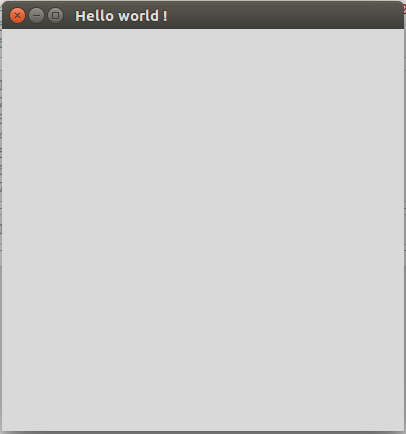
Hello world:
from tkinter import *
window = Tk()
window.title("Hello world !")
window.mainloop()
Layout managers place, pack and grid are used in tkinter to arrange widgets on the screen. On each tkinter screen only one layout manager must be used.
Pack
With the pack layout manager, a widget’s precise position on screen need not be specified. A widget can be displayed on the screen by simply using the widget.pack() command, where in the brackets, one can also specify additional display options, as in the example below.
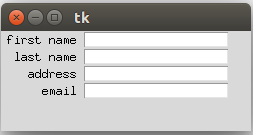
Grid is similar to pack in the sense that there is not need to specify the precise position of widget on the screen. The difference from pack is that it arranges widgets in a grid of rows and columns.
from tkinter import *

window = Tk()
window.geometry("250x100")
user_info = ["first name", "last name", "address", "email"]

row_num = 0
for required_info in user_info:
    Label(window, text = required_info, anchor = E, width=10, padx=5).grid(row=row_num, column=0)
    Entry(window).grid(row=row_num, column=1)
    row_num += 1

window.mainloop()
Whenever we have a classical theory with wavelike solutions, its quantization generally gives the corresponding quantum particles. For example, Maxwell’s theory of electromagnetism predicts the existence of electromagnetic waves. So, when this classical theory is quantized we get photons, the quanta of light.
Similarly, Einstein’s theory of gravity predicts the existence of gravitational waves. Therefore, it is expected that a consistent quantization of gravity would give gravitons, the quanta of gravity ( at least in the regime where ‘nonperturbative’ effects are negligible ).
However, if we really ‘need’ to quantize gravity or not is a different question that is still not understood very well. For example, there exist ideas like “entropic gravity” in which the Einstein’s equations can be derived from some thermodynamics considerations. If gravity is really some kind of ‘entropic force’ then it would be conceptually wrong to try to quantise it and hence there would be no gravitons.
1. Physical waves travelling through a material medium (e.g. sound waves or waves on the surface of water)
2. Probability waves which are just mathematical functions whose mode square gives the probability of finding a particle in a given region of space. (e.g. EM waves can be thought of as probability waves associated with photons).
From the very definition of probability waves, their phase is not a physically observable quantity as the only physical information is contained in their mode square. Also, even though the phase velocity of probability waves can have observable consequences (for example the bending of light as it goes from one medium to another) it, in general, can’t be associated with the velocity at which the physical information is flowing.
On the other hand, for physical waves the phase velocity (or group velocity if the wave is a linear combination of several simple waves) is not only a physically observable quantity but (from its very definition) it is also the velocity of the physical information (or disturbance) travelling through the medium.
The shape of a rigid body is not Lorentz invariant and depends on the frame of observation. Earth is almost spherical when observed from a frame which is at rest relative to it. On the other hand, if we make our observations, say, from a rocket ship travelling at a speed very close to the speed of light relative to earth, then it would appear like a (almost) flat disc (See Length Contraction).
 Random thought modules.